InfoGallery
Back

Cleis

A password manager and contact book for Windows and macOS. Your vault stays encrypted on your own computer.

Privacy policy

Year

2026

Platforms

Windows — macOS

Scope

Passwords — Contacts — Teams

Encryption

AES-256-GCM — Argon2id

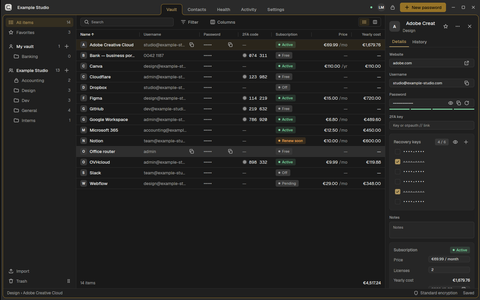
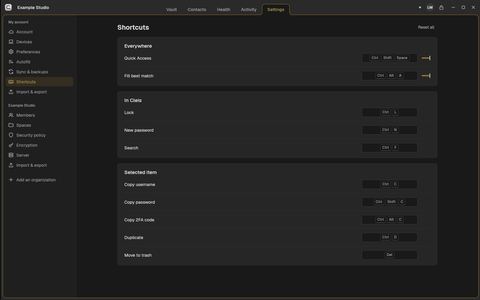
Cleis keeps passwords, two-factor codes, recovery keys and contacts in a vault sealed on your computer, with AES-256-GCM and a key derived from your password by Argon2id. A keyboard shortcut types them into the app or web page in front of you.

On your other computers

An encrypted copy of the vault can be kept where you choose: a private GitHub repository, an SFTP server, a synced folder, or the app folder of OneDrive or Google Drive. The provider stores the file but cannot read it. With Google Drive, Cleis only reaches its own hidden app data folder.

For teams

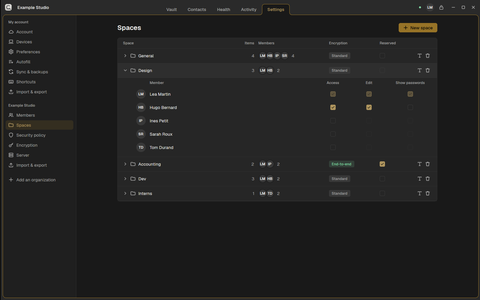
An organization shares chosen folders between its members, with rights per folder, from a server it installs itself (a NAS, a Linux server, a computer of the office) or from a shared folder.

No account with us

No advertising, no analytics, and no Cleis server collecting your data. How Cleis handles your data, including data from Google and Microsoft, is set out in the privacy policy.

Reach out.

Let’s work together to bring your ideas to life.

matthis.vny@gmail.com+33 6 68 92 20 73
ArtstationLinkedInInstagram

© 2025 All rights reserved

Cleis vault: passwords with their two-factor codes, subscriptions and recovery keys
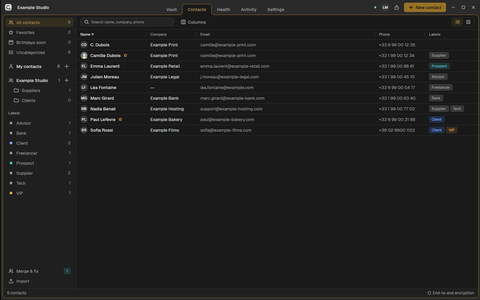
Cleis contacts: a contact book next to the passwords
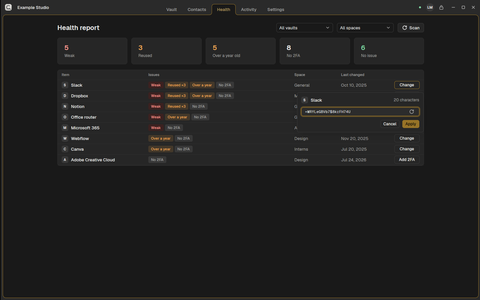
Cleis health report: weak, reused and old passwords, changed in place
Cleis organization: shared folders with access, edit and show-password rights per member
Cleis shortcuts: fill and copy from the keyboard
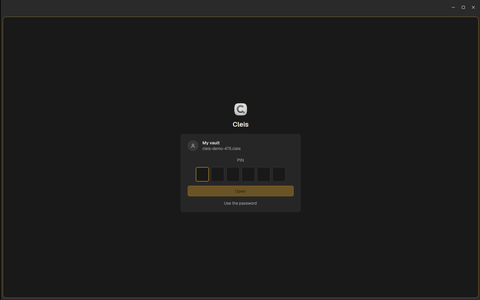
Cleis unlock screen with a PIN
Privacy policy